Stays by Origin and Guest Type
Report parameters
|
Field |
Description |
|---|---|
|
Report Name |
The name of the report. |
|
Start Date |
The start date from when the data must be considered for generating the report. |
|
End Date |
The end date until when the data must be considered for generating the report. |
|
Report Options |
Available options include the following:
|
|
Origin Type/Guest Type |
Based on the selected report option, the corresponding origin types/guest types are displayed as options in the drop-down list. Users can select multiple or all the available types from the list to be displayed in the report generated. |
|
Include All Stays |
When enabled, the reservations of all statuses will be displayed in the report. When disabled, only reservations in the Checked-In or Checked-Out status will be displayed. |
Sample Report
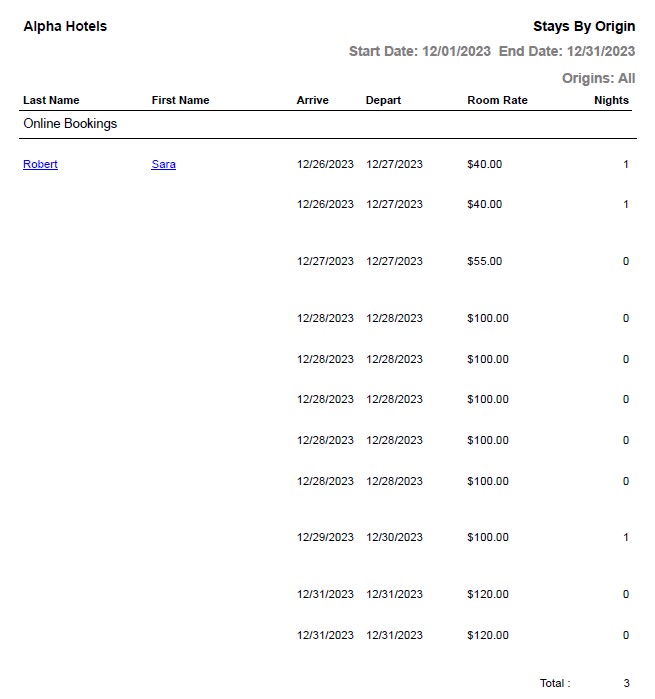
Report Fields
|
Field |
Description |
|---|---|
|
Last name |
The last name of the guest will appear as a hyperlink and clicking it will navigate the user to the guest record. |
|
First name |
The first name of the guest will appear as a hyperlink and clicking it will navigate the user to the guest record. |
|
Arrive |
The arrival date of the guest. |
|
Depart |
The departure date of the guest. |
|
Room Rate |
The room rate for the current day of stay. For example, if a reservation was created for 5 nights and the report is generated on the 3rd day of stay, the room rate for the 3rd day will be displayed in this column. However, for reservations in the past, the room rate for the first day of stay will be displayed. |
|
Nights |
The number of nights of stay for each guest is shown. |
|
Total |
The total number of nights of stay for the selected date range. |